
Product · Notebooks & Data Science
Notebooks your whole team can work in together.
JupyterLab 4 with Spark ready in every kernel, GPU editions, a no-code chart builder, real-time co-editing, Git and MLflow. Then schedule the notebook as part of a workflow and watch it in Lens.
See it run
Type, run, chart, share. Then scale out.
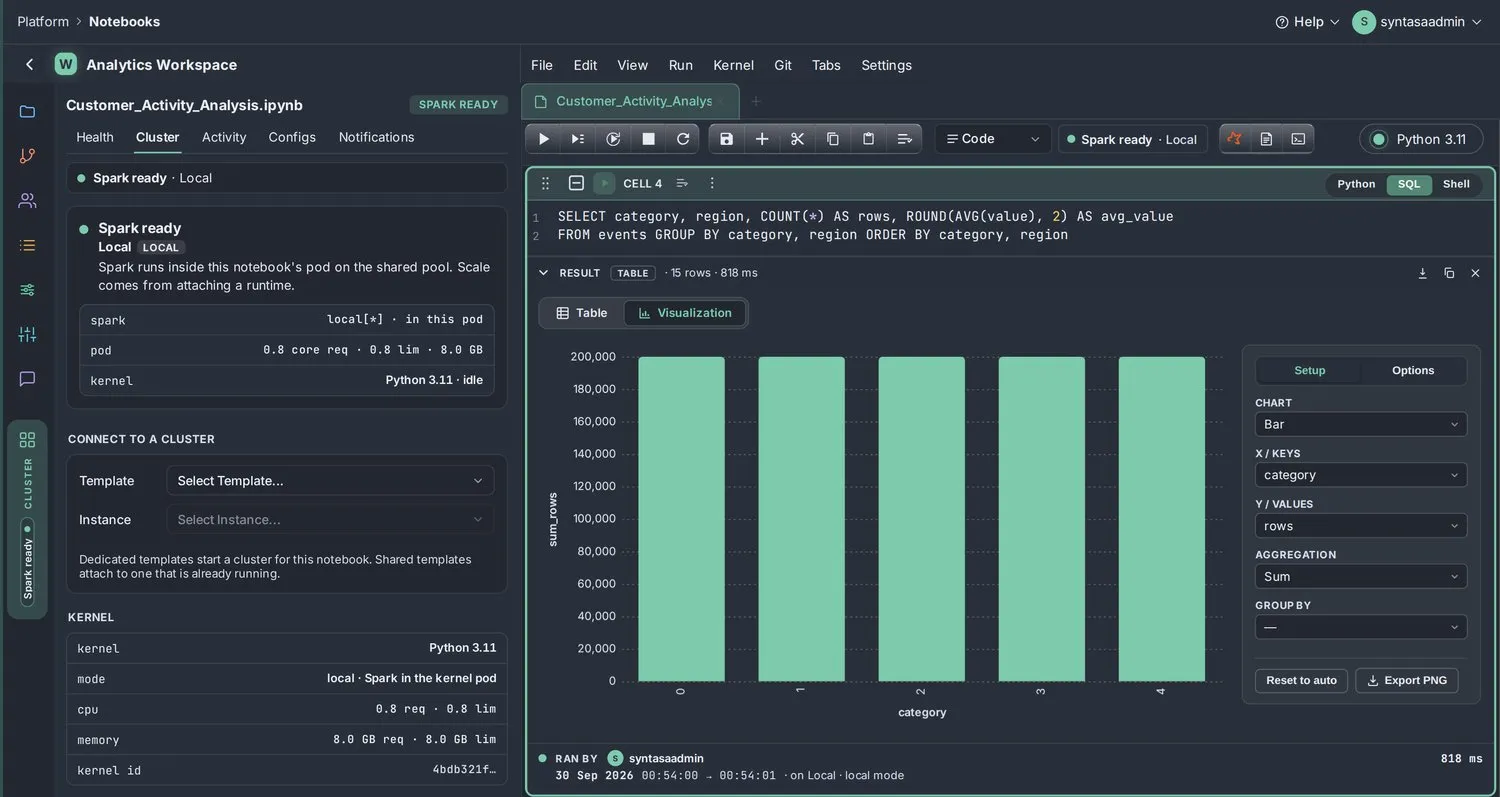
Two teammates in one notebook: cells typed and run, a SQL result turned into a chart, a teammate editing live, and the same code moved from local Spark to a remote cluster.
Illustrative people and data · modeled on the Syntasa notebook
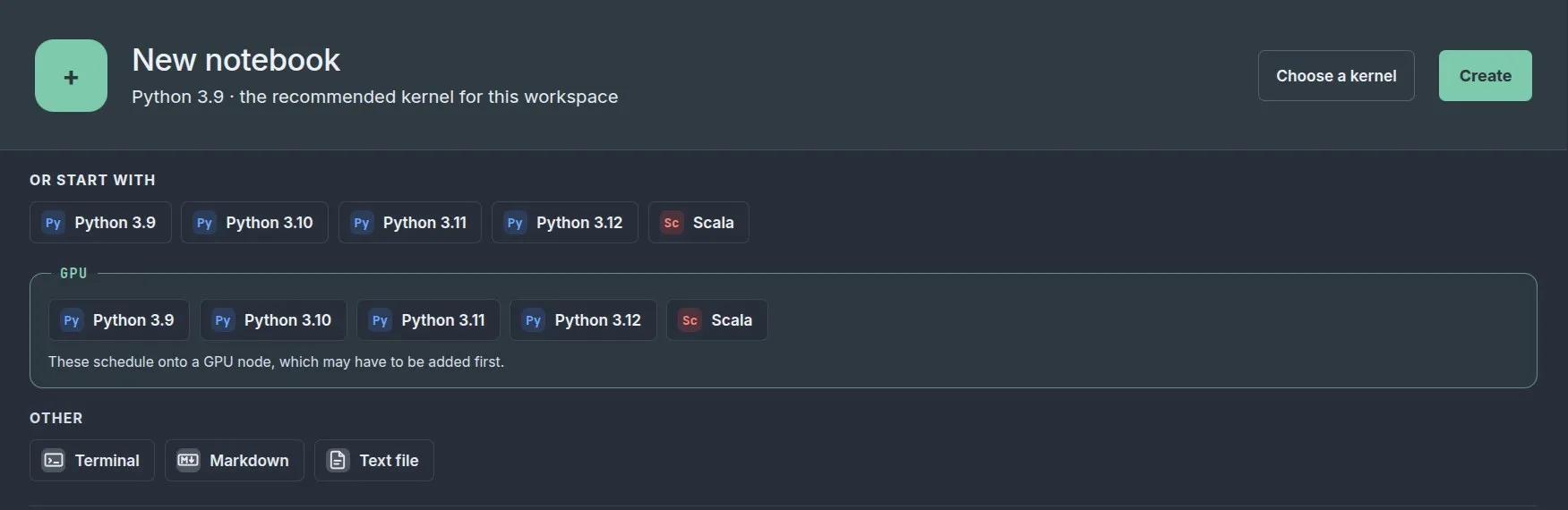
- Kernel pickerPython 3.9–3.12 or Scala, each with a GPU edition.
- Python · SQL · ShellEvery cell switches language in place.
- Table | VisualizationChart type, keys, values, aggregation, group by.
- Real-time co-editingTeammates type in the same notebook, live.
- RAN BY stampsWho ran each cell, when, for how long, and where.
- Local → remote clusterStart local; attach a runtime cluster when the data grows.
- Schedule itRun the notebook as a step in a workflow.
- Git built inClone, commit and manage credentials.
- MLflow trackingExperiments tracked automatically.
How it works
From a blank notebook to a scheduled job.
Step 1: Open a workspace
A notebook workspace for your project, shared with your team.
Step 2: Pick a kernel
Python or Scala, with or without a GPU.
Step 3: Attach Spark
Use Spark in the notebook, or attach a runtime cluster.
Step 4: Query and chart
Mix Python, SQL and Shell; chart any result.
Step 5: Schedule it
Add the notebook to a workflow and run it on a schedule.
Kernels
Ten kernels. GPU when you need it.
Python 3.9 to 3.12 and Scala, each available as a standard and a GPU edition. GPU kernels include RAPIDS-accelerated Spark for heavy feature engineering and training.
- Same libraries and Spark version across kernels
- GPU runtimes for notebooks and batch work
- AI assistance in the notebook when you want it
| Kernel | Standard | GPU |
|---|---|---|
| Python 3.9 | Yes | GPU edition with RAPIDS-accelerated Spark |
| Python 3.10 | Yes | GPU edition with RAPIDS-accelerated Spark |
| Python 3.11 | Yes | GPU edition with RAPIDS-accelerated Spark |
| Python 3.12 | Yes | GPU edition with RAPIDS-accelerated Spark |
| Scala | Yes | GPU edition with RAPIDS-accelerated Spark |
Spark
Spark is ready before you are.
Two ways to run, both tracked in Lens.
Spark in the notebook
A local Spark session starts with the kernel, sized for exploration. Good for prototyping and smaller data.
Attach a runtime cluster
Connect the notebook to a Syntasa runtime on EMR, Dataproc or Kubernetes for full-scale work, then detach when done.
Charts without code
Any result, one click to a chart.
Switch a result from Table to Visualization and choose bar, line, area, scatter, pie, donut or histogram, with sum, average, count, min or max. Totals are computed on the whole result.
Collaboration
Work on the same notebook, at the same time.
Real-time co-editing
See teammates in the notebook and edit together.
Share links
Send a link; permissions decide what others can do.
Git
Clone repositories, commit changes and manage credentials.
Workspaces
A notebook workspace per project or team.
To production
From exploration to a job you can trust.
Add the notebook to a workflow and schedule it. MLflow tracks experiments automatically. Lens shows notebook health and kernel activity, so you know when something needs attention.
- Notebooks as scheduled workflow steps
- MLflow tracking, themed to match the app
- Notebook health and kernel views in Lens
Open a notebook on your data.
We will set up a workspace with your team and walk through Spark, charts, GPUs and scheduling on a real question you have.